



Trantor® SecureWiFi lets companies adopt wireless alongside wired connectivity, including on the corporate networks that are usually denied a wireless channel for security reasons.
What Trantor® SecureWiFi solves
In the companies that care most about security, WiFi for employees often simply does not exist: exposing the most confidential networks over the air is too great a risk. So the infrastructure is limited to cable, or a project is launched with the complex solutions on the market, expensive and slow. SecureWiFi is the third way: a high security wireless network, standing in a short time and without complication, that brings employees onto the most critical corporate networks too.
WiFi forbidden
Wireless for employees is often banned: no trust, no WiFi, and internal mobility stays awkward. Deploying a wireless network need not mean putting network security at risk; done properly, it can raise it.
The shared password
One key for everybody means no identity at all: whoever connects cannot be told apart, and revoking access for one person is impossible, you change the key for everyone. SecureWiFi uses certificates for the regular users of the network, and multiple single-use passwords for guests.
Solutions that exist, but are hard to adopt
The most advanced platforms on the market can do everything: at the price of substantial licences and months of integration work. And the experience of the end user is rarely among the priorities.
IoT in the company
Cameras, sensors and printers are the most vulnerable devices, and they are the ones that most need a secure wireless connection.
«Wireless is not only for guests: it can contribute to securing the most critical corporate networks. Companies are entitled to a solution that does all of this simply, and in a short time.»
SecureWiFi, a technical overview
A Linux based server appliance
The central software, Trantor® SecureWiFi Appliance, is based on AlmaLinux 10 and can be installed on virtual machines or on bare metal, x86 and ARM. That is where the command centre of the solution lives. It has full support for high availability through redundancy.
A web interface for management and self-service
Trantor® SecureWiFi Appliance exposes a web interface both for system administrators, who use it to manage the wireless infrastructure, and for end users, who use it to configure WiFi on their own devices without asking anyone.
Trantor® WiFi access points
The solution uses purpose-built access points, the Trantor® SecureWiFi APs, which connect to the SecureWiFi Appliance and serve the WiFi inside your company. They support PoE power, fully centralized updates and management, and protocols up to WiFi 7 on 2.4/5/6GHz, with antennas that can be extended over a cable.
Authentication by multiple passwords or by certificate
SecureWiFi can serve networks that accept pre-shared passwords (WPA2/WPA3-PSK), which may also be multiple and single-use. For regular and critical users it supports authentication by certificate and by username and password (WPA2/WPA3-Enterprise with 802.1X), which delivers far stronger security and mutual authentication. SecureWiFi can be self-sufficient: local users can live in the appliance. To connect it quickly to your corporate directory, SecureWiFi speaks LDAP, Active Directory included, so membership of an LDAP group becomes permission to join a given wireless network. Those who also have Trantor® Imago can use it as the identity backend in place of LDAP and unlock further capabilities, among them device enrollment through SSO (OIDC and SAML); the identity still stays inside the company, without passing through anyone’s cloud.
Client segregation and support for multiple VLANs
Every wireless network can land its clients on a different corporate network (VLAN), and even the same wireless network can land clients on different VLANs depending on who is connecting to that AP. Clients can also be isolated from one another, so that an infected device cannot attack the others on its own network.
Advanced diagnostics
A set of features for advanced diagnostics of connection and stability problems is in development. It includes capturing the network traffic at the moment of the failure, so that intermittent problems can be analyzed too, and predictive statistics measured on real software in use, video calls for instance. As always, no data leaves your company.
Control lives on-premise, inside your company: the network does not depend on an external service, on its terms or on its reachability. Isolated and confidential environments can have wireless too.
From the floor to the datacenter
Below is how the SecureWiFi solution works: on every floor there are the clients (phones, tablets, laptops, desktops, IoT devices and printers) talking WiFi with the Trantor® APs; the APs, connected to the floor’s PoE switch, converge into the datacenter, where the SecureWiFi appliance in high availability governs everything.
Solid line: wired link · dashed line: WiFi. Illustrative diagram: floors, APs and networks scale as needed.
The client associates with the AP on its floor and authenticates with its certificate against the central server; the server verifies the identity and lands the client on the right corporate network (VLAN): from there it talks to the rest of the network under the company’s usual firewall and security policies.
AP TR201
Full name: Trantor SecureWiFi AP TR201. The access point we assemble ourselves, driven by the central server. Its specifications follow.
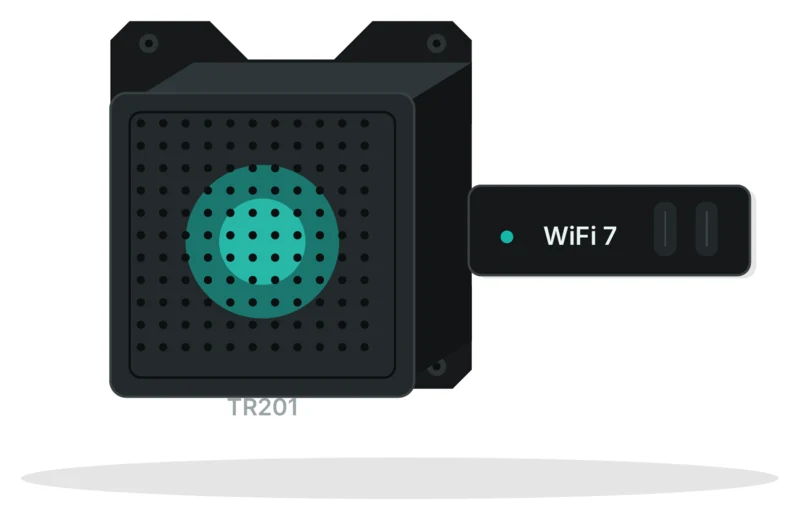
ARM64 board running Linux
Two WiFi cards: one WiFi 5 (802.11ac) dual-band 2.4/5GHz and one WiFi 7 (802.11be) tri-band 2.4/5/6GHz (both backward compatible with 802.11a/b/g/n, and the WiFi 7 card also with 802.11ac/ax)
RJ45 1Gbit/s PoE+ (802.3at) 48V 20W input: a single cable carries data and power; a compatible PoE injector is included in the box, for those who would rather not use PoE switches
External, orientable, and extendable over a cable
Wall or ceiling plate, compatible with the VESA 100x100 and 75x75 standards
One WiFi network per card at most (so one WiFi 5 network and one WiFi 7 network)
About 25 clients per access point, area covered varies
802.11r/k/v: moving from one AP to the next does not interrupt the session
Automatic channel and power selection, coordinated by the central server
WPA2/WPA3-PSK and WPA2/WPA3-Enterprise, with single or multiple passwords, or with 802.1X certificates
Static VLAN per wireless network, or dynamic VLAN per user
Configuration and updates from the central server
Not supported, by design: every AP is wired, so there are no invisible radio bridges inside the network
Trantor® SecureWiFi and the alternatives
Every alternative below is a serious product with real strengths. The useful comparison is not the feature list: it is where control lives, whether identity is included or is a second purchase, and what is left for you to do.
| SOLUTION | WHERE CONTROL LIVES | IDENTITY AND ONBOARDING | WORTH CONSIDERING |
|---|---|---|---|
Trantor® SecureWiFi Trantor® · Italy | On-premise appliance, on a VM or on bare metal: no mandatory cloud, works in isolated environments too | Included and self-sufficient: RADIUS, CA and self-service portal, with local users or LDAP against your directory. With Trantor® Imago you also get enrollment through SSO (OIDC and SAML) | Trantor® access points, purpose-built for the SecureWiFi platform, and open to customization where the requirement calls for it |
Cisco Meraki Cisco · non-EU | The vendor’s cloud, not optional | 802.1X yes; the CA and onboarding call for Cisco ISE or a third party | The most widely deployed, and among the best cared for in daily use; predefined models only |
HPE Aruba Central and ClearPass HPE · non-EU | Central is cloud, on-premise controllers remain available | ClearPass covers identity and onboarding: separate product, separate licence | Very strong on dense deployments; the cost is made of several licences, and the Juniper merger is moving catalogues and support models |
Juniper Mist HPE · non-EU | Cloud is mandatory: assisted diagnostics is the product | Access Assurance, separately licensed, with SSO on the end user portal | Radio diagnostics without rivals; no on-premise option, and the catalogue is being consolidated inside HPE |
Ubiquiti UniFi Ubiquiti · non-EU | Controller on-premise or in the cloud | Basic RADIUS; certificates and self-service onboarding are not there | Hard to beat on price for offices; advanced identity management is missing, and support is not enterprise class |
PacketFence open source · with third party APs | On-premise | A complete NAC: 802.1X, portal, dynamic VLANs, certificates over SCEP | Free and mature software; integration with the access points, sizing and maintenance stay with the customer |
SecureW2 · Portnox non-EU · with third party APs | Cloud | This is their craft: certificates, onboarding and managed RADIUS, with SSO against your identity provider | They do not supply access points: they add to a wireless infrastructure you already own, and identity travels through their cloud |
Positioning summary as of August 2026, from public sources. Every platform cited is a valid product in its own context of use; trademarks belong to their respective owners.
Works with the rest of the ecosystem
The SecureWiFi server runs as a dedicated machine, or as a VM on TVirt.
Imago as the identity backend in place of LDAP: it also unlocks device enrollment through SSO (OIDC and SAML).
Last updated: 10 August 2026. The contents of this page follow the brochure of that revision.
Let’s design your WiFi.
A session to map your network: guests, IoT, offices and meeting rooms, and the plan for segregation and strong authentication.